September Pop In: React Tidbits

September Pop In: React Tidbits

Hi All,

Just wanting to say hi while we’re in September. It’s been pretty busy at work and with Ellie being schooled again. ‘Twas the longest spring break ever. . . I’ve been doing a lot of work in React recently , which sometimes feels like, “yes, I’ve got this!” Then I have to deal with modifying state and then it’s all, “NOPE. What the world in the heck is going on??”

Here are a few of my observations with React after muddling around in it a while.

  • Why does wrapping my component in <> and </> magically make it work??
    • Turns out it’s called a React Fragment and it’s for letting you return multiple children without jacking things up. Please see link for less janky explanation.
  • Why is testing it so convoluted?
    • This is probably on me. I’m getting better at some parts of testing React, but it’s still mysterious.
    • It seems like you want to test the workflow rather than if X == Y specifically. So like if you click a button you want to make sure that when you do click it, all the things you want called and done are actually called and done.
    • Mocking is your friend and don’t try to test too much in one component. So if your component is calling a permission checker, only test up to the point where the permission checker is called and that you do call it. Then test the specifics of the permission checker in a new test.
  • State variables are cool, but it’s kind of tricky to debug them.
    • Just go and read about State Hooks. I don’t have a super firm grasp on it yet, so this here is mostly reference for me.

React isn’t really one of the things that I thought I’d be learning, but here we are and while parts of it are fine (I’m better at writing components) other parts are still just tricky to deal with (adding in redux for one). BUT! I’m learning and getting better at it and my goal is to not have to ask questions about the same thing over and over, which I hope I’m accomplishing.

More next time!

-Rachel
Remote Work Day 17: Still at Home Learning

Remote Work Day 17: Still at Home Learning

Hey All! It’s been a few since I’ve been on here. My goal was to write every day, but you know what? Being home every day just working doesn’t exactly lend itself to riveting storytelling or edge-of-your-seat intrigue. This would be the part in the book that is skipped over in a brief sentence or so. “Weeks from working from home passed until one day. . .” So yeah, sorry. (Not that sorry)

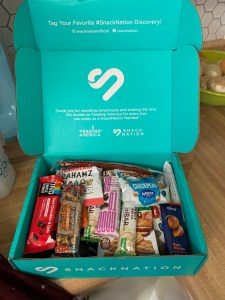
a teal box with an assortment of snacks sitting on a countertop
Work sent a snack box to everyone. It was awesome!

It’s been really nice to see Ellie learn on a daily basis and be a part of her education. I have also really enjoyed just having her around. I know this seems to be the opposite of what most people are saying nowadays, but I miss Ellie a lot during the days when I’m at work. She’s a hoot to be around and is very good at entertaining herself most of the time. This isn’t meant to be a brag or anything, just what’s currently going on.

Overall, I’ve enjoyed working remotely even with the added layer of being teacher. That being said, I’ll be very glad when she’s able to be schooled normally again. Forsooth, I am not an educator. Eighty percent of who she’s learning from is from Ms. YouTube (at least on my end. Brett takes over educating after lunch). Her being the social butterfly she is really misses her friends and getting out. She’s been sending friends and family Marco Polo messages to stay in touch.

I’ve also liked the flexible working schedule. I still stick to my normal hours for consistency, but I can sit out on the deck and work if I wanted to. I can get some laundry started when I’m on a quick break. I do miss being around my co-workers and being able to have the more organic chats about problems. Zoom meetings are just more formal and intentional since you have to find a time that works and have a purpose for them (even if it is just to chat and catch up).

Work-wise, I’m learning more and more about how to set up data for tests and writing tests, and debugging tests. That’s all new and exciting. I don’t have a ton to report on that since I’m still figuring it out and developing an understanding of it. I’ve had to remind myself over and over that learning is hard. Learning takes time and is a process. I can’t know everything immediately.

What have you been learning about? Either from your work from home experience or at work? Let me know!

-Rachel

Tinker with Your Thinker

Tinker with Your Thinker

Howdy howdy howdy! It’s still January and it’s getting ready to be all snowy and icy here. Whee. . . It’s just my favorite. . . You know I’d much rather be scraping snow off my car in the extreme wind than say, sitting on the dock at the lake with a book and iced coffee eagerly awaiting a boat ride later in the afternoon.

Anyhoo, so recently I’ve been thinking a lot about knowledge and how much I know and how much I don’t know and such and such. I tend to go down the rabbit hole of thinking about how many topics and concepts and etc that I don’t know about or don’t know enough about and then just start wallowing in my thoughts. Which got me thinking. . .

Bart Simpson writing, "I will not wallow in my thoughts" on a chalkboard in a classroom.
Look, Ma! I found a

It really isn’t about how much you know, but what you do with the knowledge you do have. I have been trying to focus on what I do know and what I can accomplish with that knowledge, rather than getting discouraged by thinking about all the things I don’t know enough about. With the knowledge I do have, I can do a ton of stuff. And the more I do with what I have, the more potential I have to learn new things. For example, I know how to knit. I’d like to knit something new sometime soon (I want to make some cute mittens or maybe a sweater). I’d really like to have it be in a fair aisle pattern, but I’ve never attempted such a thing. Instead of me getting discouraged, I’m going to just pick a project and start it.

I’m not going to become an expert overnight in some subject, but I do know that I can learn new things every day. And all these new little tidbits of learning add up over time.

-Rachel

Read the Documentation

Read the Documentation

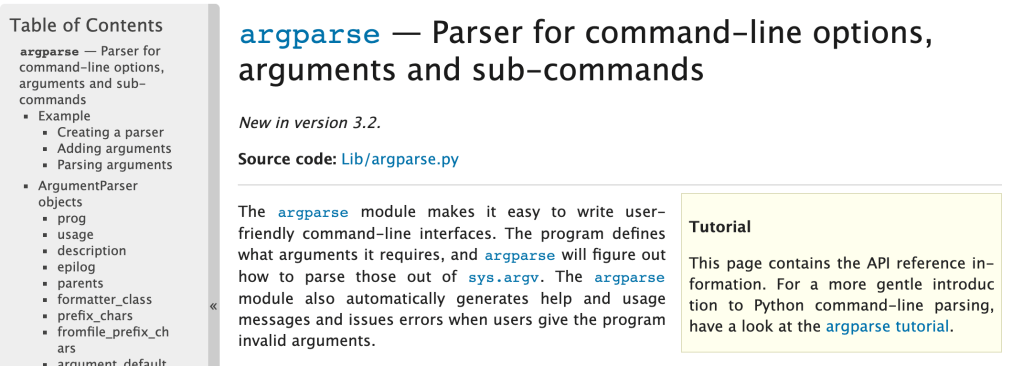
So when I start off learning something, I want to have a perfect knowledge of everything right away. I know that’s not realistic, but here we are. When I have a question about a topic, I generally just do a Google search and find the nearest Stack Overflow article that seems relevant and see what they did to solve my issue. Recently though, I’ve been taking more time to sit down and actually read documentation on specific modules, concepts, technologies, etc and it’s been very helpful. I’ll give some explanation as to why I recommend you read documentation.

Documentation gives you the most in-depth and up-to-date information as to what you’re researching. I always check the date on any articles that aren’t documentation because you never know how old they are and if they’re still relevant. Other types of articles may do a good job at addressing one aspect of what you’re looking for, but if you read the documentation, you’ll get to see other things you might not have realized were options.

You will learn more comprehensively than exclusively reading articles or forum posts. A blog post may not cover every possibility and option available to you for a module, but the documentation will.

You’ll get better at reading and understanding how to read documentation. And with that, get a better understanding of how whatever you’re learning about works. I used to steer clear of reading a lot of documentation because I thought it was difficult to understand. And sometimes it kind of is. However, I’d recommend sticking with it.

-Rachel

Rachel Learns About Docker: Basic Definitions

Rachel Learns About Docker: Basic Definitions

So Docker. Docker. Everyone’s talking about Docker a lot. Everyone says Docker is important. So what does one do about all this Docker? Well, I started reading the documentation because I have only a vague idea of what it is supposed to do.

I do like their logo.

My initial thoughts on reading the overview:

  • Seems very similar to Python virtual environments but not restricted to just Python.
  • I have a suspicion that I could develop and deploy my apps for work easier with this.
  • There’s a lot to learn and a lot of definitions to keep straight and remember.

For my own benefit, I’m going to outline here some key definitions from my reading. Usually writing something down helps me remember it and solidify the concepts.

Docker consists basically of images that you use to make containers which allows you to have a lot more flexibility with moving around and editing and deploying applications. Below are some basic definitions are each, which I found helpful to have outlined a bit more succinctly than their wordier explanations in the official documentation.

Docker Images

  • Read only template
  • Generally base it on one image and then customize your own image to suit your needs
  • Defined in a Dockerfile
  • Like onions and ogres, Dockerfiles have layers. Unlike ogres, Dockerfiles define the layers with instructions.
  • Only changed layers are rebuilt when the image is rebuilt
  • The image provides the filesystem

Docker Containers

  • TL;DR a container is an encapsulated running process with it’s own filesystem
  • A runnable image instance
  • Define your container with its image and your configuration options
  • Isolated from everything else and you get to control networking, storage, etc on it.
  • Uses namespaces for each container and container isolation
  • Use control groups to limit an application’s resources

Docker Services

  • Swarm = scale containers across multiple Docker daemons
  • Daemons communicate through the Docker API
  • Lets you define the state for your swarm.

Well, there’s the very basic gist from my reading. I was able to get Docker desktop successfully installed and running no problems with their documentation. More later.

-Rachel