It’s Hard To Talk to Engineers: A Primer

It’s Hard To Talk to Engineers: A Primer

So it’s been a year working from home now which is something. It’s also Women’s History Month (for not much longer, but here we are). I’m going to talk about something that’s happened to me many a time in honor of March and working from home and all the female engineers I know.

Maybe you know an engineer. This engineer doesn’t necessarily have to be a software engineer, but mechanical, chemical, aeronautical, you name it. Have you ever asked that engineer what she’s been doing at work, how work’s been going, or something to that effect? Or perhaps this engineer has brought up work in a conversation. Maybe you’re just being introduced to this engineer and you’re finding out what she does for a living. The conversation might go like this,

“How’s work been going?”

“Pretty good. I’ve been working on [insert project here].”

“Oh wow, that sounds complicated. Haha you’re smart.”

“. . .thanks? . . .”

Conversation moves to something else.

Another situation you might run across is a very excited engineer wanting to show you a project she’s been working realllllly hard on for a long time.

“Want to see my project I just finished up??”

“Sure.”

“Look! It’s [insert project]!

“Cool!”

“. . .thanks. . .”

Conversation ends.

I get it. It’s hard to come up with conversation for topics you may not be super familiar with. It isn’t just for engineers (I’m guilty of this in conversation too), but this is my wheelhouse and I’m using it as an example.

Now, what might one say instead of the token “cool” responses? I’ve been thinking about this for quite a while and here’s a few to get you started:

  • What’s been the most challenging part of this project?
  • What problem were you trying to solve?
  • How does X work?
  • Which part are you most proud about figuring out how to solve?
  • Did you have to work with teammates on this project? How were they?
  • What would you improve if you had to do it over again?
  • Are there any new concepts/technologies you used?
  • What was the most fun/challenging thing to learn about?

My intention is not to make anyone feel bad, because I know not everyone wants to hear a ton about work stuff all the time. I also know that it’s really hard to have an in-depth conversation with someone about technical information you’re unfamiliar with. (So, how’s all that tension in the metals and bending going, mechanical engineers?) I just hope that it encourages you to ask a follow up question or two the next time you stumble into one of these conversations. You’ll make an engineer feel seen and happy.

More next time!

-Rachel

Musings on Versioning and Poetry

Musings on Versioning and Poetry

Well, it’s almost the end of February, so I thought I’d say hi. There really hasn’t been much that has piqued my interest in the coding realm recently to want to jump in and write about it. However, the other day I came across something where I had to dig into python versioning with poetry. I thought you all would love to hear my thoughts on it. Because why else would you be here? Anyhoo, poetry.

So you know how a project has packages you’re going to use for it and those are your dependencies. And those packages have dependencies and keeping it all straight manually is a thing. So you use poetry to keep track of it all. You have a pyproject.toml file you can define your packages and the versions you need them to be. And then you’ve got your poetry.lock file that keeps track of all the packages and versions and tasty nuggets you have in your project.

My questions were:

  1. Can my poetry.lock file update itself by running poetry update without me having updated my package versions in pyproject.toml?
  2. When do i use poetry install versus poetry update?

What I discovered:

So if you update poetry without updating your pyproject.toml file, it is possible for poetry.lock to update itself. Here is why. It depends on what versions you have defined. So say you have version ^1.2.3 defined for a package and the package version you’re running is 1.2.3. If that package comes out with another patched version, say 1.2.5, your pipfile.lock would update because it falls into the requirements you defined (versions >=1.2.3 and <2.0.0)

The next question is answered in their documentation (shocker, I know. Who would have thought reading the documentation would yield results?) Anyhoo, poetry install installs the versions you have defined in your poetry.lock file and doesn’t do any resolving. Whereas, poetry update resolves the latest dependencies and updates the poetry.lock file. So it’s like running poetry lock (locks your dependencies from pyproject.toml) and then poetry install but doing it with one command.

Overall an interesting topic. Do you use poetry for package dependencies?

More next time!

Rachel

September Pop In: React Tidbits

September Pop In: React Tidbits

Hi All,

Just wanting to say hi while we’re in September. It’s been pretty busy at work and with Ellie being schooled again. ‘Twas the longest spring break ever. . . I’ve been doing a lot of work in React recently , which sometimes feels like, “yes, I’ve got this!” Then I have to deal with modifying state and then it’s all, “NOPE. What the world in the heck is going on??”

Here are a few of my observations with React after muddling around in it a while.

  • Why does wrapping my component in <> and </> magically make it work??
    • Turns out it’s called a React Fragment and it’s for letting you return multiple children without jacking things up. Please see link for less janky explanation.
  • Why is testing it so convoluted?
    • This is probably on me. I’m getting better at some parts of testing React, but it’s still mysterious.
    • It seems like you want to test the workflow rather than if X == Y specifically. So like if you click a button you want to make sure that when you do click it, all the things you want called and done are actually called and done.
    • Mocking is your friend and don’t try to test too much in one component. So if your component is calling a permission checker, only test up to the point where the permission checker is called and that you do call it. Then test the specifics of the permission checker in a new test.
  • State variables are cool, but it’s kind of tricky to debug them.
    • Just go and read about State Hooks. I don’t have a super firm grasp on it yet, so this here is mostly reference for me.

React isn’t really one of the things that I thought I’d be learning, but here we are and while parts of it are fine (I’m better at writing components) other parts are still just tricky to deal with (adding in redux for one). BUT! I’m learning and getting better at it and my goal is to not have to ask questions about the same thing over and over, which I hope I’m accomplishing.

More next time!

-Rachel

Helpful Links for Covid-19 Information and Data

Helpful Links for Covid-19 Information and Data

So it is work from home day whatever. I don’t know, I’ve stopped counting. I thought I would share some links to some resources that I have found helpful with keeping informed data-wise with ol’ Big-Rona. I’ll order them in the amount of information from globally to locally. This will be Illinois specific, but you’ll get the idea if you live in another state and will be able to find corresponding information for whichever place you live in.

These are my go-to links and I hope you find them useful. Are there any other sources of information you find informative? Let me know!

More next time!

-Rachel

When One Liners Make Sense

When One Liners Make Sense

Have you ever written a little one or two line snippet of code you were super proud because it was oh so short and sneaky and clever? But then, like a month (or 20 mins) later, you have to go back to it and you have no idea what that stinker’s actually doing? Yeah, me neither.

A close up of a long haired tabby cat staring directly at the viewer
Keep Calvin happy! Write clean code!

I have some thoughts on little clever bits of code. First of all, they’re cool. Yay for figuring out how to compress say 15 lines into two! Second of all, they can drive me nuts when having to go back to review old code. Especially if it contains regex (shakes fist at regex). I also think that there are sometimes places that are more suited for the clever bits than others. Let me explain . . .

I think that if you’re deliberately trying to condense your work down into fewer lines for the sole sake of fewer lines, you’re in danger of losing the overall clarity of you code. And in the long run, that’s going to make your code more difficult to maintain by you and others.

Now when do I think that a cute one-liner is appropriate? I like to use them when doing so doesn’t distract from the overall idea of the function or method I’m writing. It’s like a mini subroutine (but not) that I don’t have to do any extra work for. For example:

# x is a datetime field
sorted(my_list, key=lambda x:x[1], reverse=True)

I could have written a helper function that went through my list and sorted them by date then reversed it, but it turned out to be much more concise to use a lambda function within the built-in sorted() function. It also made way more sense to just use a built in function rather than writing my own.

Another example:

# _ can be used in python editor to reference whatever 
# was on the previous line. Fun, right?
>>> [1, 23, 1, 45, 5, 9]
[1, 23, 1, 45, 5, 9]
>>> [s for s in _ if s > 10]
[23, 45]

# The following is equivalent to above 
# but in more lines.
foo = [1, 23, 1, 45, 5, 9]
foo2 = []
>>> for each in foo:
...     if each > 10:
...         foo2.append(each)
...
>>> foo2
[23, 45]

But if that logic was more complex and my one liner started getting long and I had to start line wrapping it to fit? Nope, that’s going to be way more difficult to read and understand in the long run. (That also goes against the PEP 8 Style Guide. I like to stay within the 72 character line limit, thank you.) Anyone coming after you that has to do anything with that code (including you) is just going to want to whack you over the head with a boot. Just write out some loops, man.

Have fun finding clever ways of coding!

-Rachel

Debugging: Your Secret Learning Tool

Debugging: Your Secret Learning Tool

I really like going though tutorials and walkthroughs when I’m learning new things. I think that the best way for me to learn something is by doing, but generally I get overwhelmed as to know where to start. So I generally start off getting my feet wet with tutorials.

Stackblitz has been very convenient to learn with.

Right now I’m going through Angular’s app tutorial (see what I’ve done so far on GitHub) and I’ve enjoyed it. It is nice to have a guide and not beat your head against something at the beginning. However, I don’t think that tutorials are the best way for really grasping concepts. What I do think is good for that is debugging error messages.

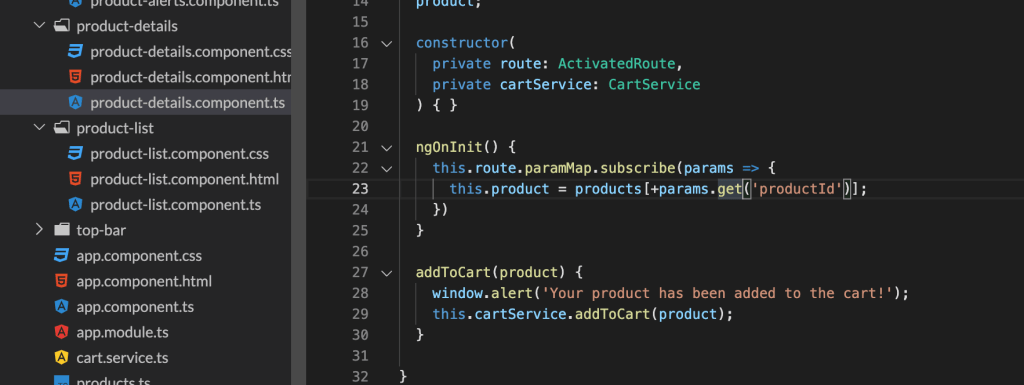
One of the errors I encountered during this walkthrough was that when I added the different phones to the shopping cart, the cart would update, not with the correct item, but just the first item in the array. I then had to go through and figure out why that wasn’t working. It turns out that I just wasn’t referencing the route parameter correctly. Curse you, case sensitivity!

While debugging this incorrect behavior, I learned that the + operator returns a numeric representation of the object in JavaScript. I would not have researched and learned that little tidbit of information if I hadn’t been debugging an error.

So if you’re ever frustrated debugging, slogging through error messages or unexpected code behavior, remember that you’re learning!

-Rachel

Read the Documentation

Read the Documentation

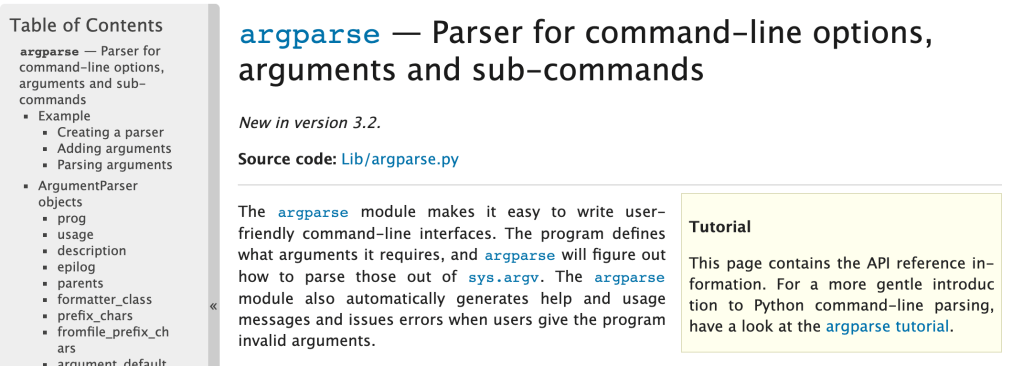
So when I start off learning something, I want to have a perfect knowledge of everything right away. I know that’s not realistic, but here we are. When I have a question about a topic, I generally just do a Google search and find the nearest Stack Overflow article that seems relevant and see what they did to solve my issue. Recently though, I’ve been taking more time to sit down and actually read documentation on specific modules, concepts, technologies, etc and it’s been very helpful. I’ll give some explanation as to why I recommend you read documentation.

Documentation gives you the most in-depth and up-to-date information as to what you’re researching. I always check the date on any articles that aren’t documentation because you never know how old they are and if they’re still relevant. Other types of articles may do a good job at addressing one aspect of what you’re looking for, but if you read the documentation, you’ll get to see other things you might not have realized were options.

You will learn more comprehensively than exclusively reading articles or forum posts. A blog post may not cover every possibility and option available to you for a module, but the documentation will.

You’ll get better at reading and understanding how to read documentation. And with that, get a better understanding of how whatever you’re learning about works. I used to steer clear of reading a lot of documentation because I thought it was difficult to understand. And sometimes it kind of is. However, I’d recommend sticking with it.

-Rachel

A Super Easy Way to Get Git Autocomplete Working on a Mac

A Super Easy Way to Get Git Autocomplete Working on a Mac

So I’ve just recently transitioned over from using a PC to using a mac for development. (I like developing on a mac a lot better) One of the first things I noticed though, was that git wasn’t autocompleting for me when I was working locally. I’m used to just ssh-ing in to servers and git just always would autocomplete. Not so with iTerm, so I went to the internet to find out how to fix this.

I found a couple of posts on Stack Overflow, outlining how to use brew and git bash-completion and tried those out with no success. I did learn about .zshrc and .bashrc and some other config files, so it wasn’t a complete loss.

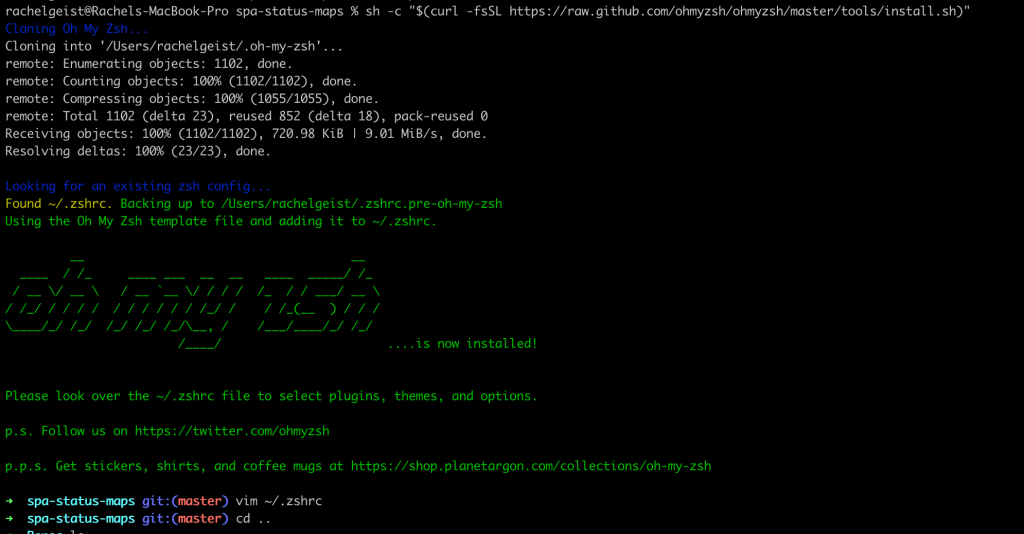
In the end, I got a tip to try Oh My Zsh. I installed it via curl as directed on their homepage and there you go. I could tab out all my git commands without having to edit bash_completion.d or any other file. There’s lots of plugins you can install and git came installed by default.

If I wanted to add more plugins, I’d just edit my ~/.zshrc file and add them as plugins. Super fast and super easy.

Look how pretty and useful!

I will say that if you want to also install the Docker plugin, there’s currently a bug with installing that one. To get that to work remove the zcompdump file in your home directory and then restart iTerm.

rm ~/.zcompdump-[DEVICE NAME]-[Numbers]

-Rachel