Musings on Versioning and Poetry

Musings on Versioning and Poetry

Well, it’s almost the end of February, so I thought I’d say hi. There really hasn’t been much that has piqued my interest in the coding realm recently to want to jump in and write about it. However, the other day I came across something where I had to dig into python versioning with poetry. I thought you all would love to hear my thoughts on it. Because why else would you be here? Anyhoo, poetry.

So you know how a project has packages you’re going to use for it and those are your dependencies. And those packages have dependencies and keeping it all straight manually is a thing. So you use poetry to keep track of it all. You have a pyproject.toml file you can define your packages and the versions you need them to be. And then you’ve got your poetry.lock file that keeps track of all the packages and versions and tasty nuggets you have in your project.

My questions were:

  1. Can my poetry.lock file update itself by running poetry update without me having updated my package versions in pyproject.toml?
  2. When do i use poetry install versus poetry update?

What I discovered:

So if you update poetry without updating your pyproject.toml file, it is possible for poetry.lock to update itself. Here is why. It depends on what versions you have defined. So say you have version ^1.2.3 defined for a package and the package version you’re running is 1.2.3. If that package comes out with another patched version, say 1.2.5, your pipfile.lock would update because it falls into the requirements you defined (versions >=1.2.3 and <2.0.0)

The next question is answered in their documentation (shocker, I know. Who would have thought reading the documentation would yield results?) Anyhoo, poetry install installs the versions you have defined in your poetry.lock file and doesn’t do any resolving. Whereas, poetry update resolves the latest dependencies and updates the poetry.lock file. So it’s like running poetry lock (locks your dependencies from pyproject.toml) and then poetry install but doing it with one command.

Overall an interesting topic. Do you use poetry for package dependencies?

More next time!

Rachel

Intentional: Word of the Year 2021 Edition

Intentional: Word of the Year 2021 Edition

Hi hi! So yes, I kind of planned this to be posted a bit earlier, but eh. I didn’t get around to sitting down to write it until now. So last year my word of the year was upgrade, and overall I think that it was a decent choice. For this year, I have been thinking a lot about what word to choose, and decided to go with Intentional. Here’s why.

I can trend towards being unintentional super fast. I just go about my business and do what needs to be done for a baseline, but start ignoring the extra stuff. So for example, going to work and doing my job is my baseline. But then when it comes to the extra (reaching out to people myself, extra reading and learning, putting myself out there in leader-y situations) I can sometimes forget about it. I have to be intentional about remembering to put the extra effort in for that extra nip.

At home it’s the same thing. I can baseline pretty well, but I’m not very intentional about doing what I would consider the “extras” all the time. In my opinion that is not a bad thing either; I can’t be on 100% of the time and doing all the things because I’d get so burned out. However, I want to be intentional about thinking about what extra things actually need to be addressed and then following through with them.

There you go, my word of the year. Do you come up with a word of the year? I think that it’s a bit easier to stick with rather than a resolution, but what do you think?

More next time! I’m thinking of discussing yaml files a bit. They’re something I’ve been looking into more recently and it helps me to wrap my head around something if I have to write about it.

-Rachel

September Pop In: React Tidbits

September Pop In: React Tidbits

Hi All,

Just wanting to say hi while we’re in September. It’s been pretty busy at work and with Ellie being schooled again. ‘Twas the longest spring break ever. . . I’ve been doing a lot of work in React recently , which sometimes feels like, “yes, I’ve got this!” Then I have to deal with modifying state and then it’s all, “NOPE. What the world in the heck is going on??”

Here are a few of my observations with React after muddling around in it a while.

  • Why does wrapping my component in <> and </> magically make it work??
    • Turns out it’s called a React Fragment and it’s for letting you return multiple children without jacking things up. Please see link for less janky explanation.
  • Why is testing it so convoluted?
    • This is probably on me. I’m getting better at some parts of testing React, but it’s still mysterious.
    • It seems like you want to test the workflow rather than if X == Y specifically. So like if you click a button you want to make sure that when you do click it, all the things you want called and done are actually called and done.
    • Mocking is your friend and don’t try to test too much in one component. So if your component is calling a permission checker, only test up to the point where the permission checker is called and that you do call it. Then test the specifics of the permission checker in a new test.
  • State variables are cool, but it’s kind of tricky to debug them.
    • Just go and read about State Hooks. I don’t have a super firm grasp on it yet, so this here is mostly reference for me.

React isn’t really one of the things that I thought I’d be learning, but here we are and while parts of it are fine (I’m better at writing components) other parts are still just tricky to deal with (adding in redux for one). BUT! I’m learning and getting better at it and my goal is to not have to ask questions about the same thing over and over, which I hope I’m accomplishing.

More next time!

-Rachel

The Art of Being Stuck on a Problem

The Art of Being Stuck on a Problem

Hey All! It’s been crickets on here for a bit, but there really hasn’t been a lot of inspiration recently. July has been nice and we were able to go on a bit of a vacation with family which was enjoyable. My work computer has decided to reboot itself and install updates, so here we are.

I’ve been stuck on a problem for a few days now. It’s a frontend problem (React/Redux) which I’m still quite unfamiliar with. All my normal guys I’d go to for asking questions to are on vacation this week. I’ve been poking around and trying to figure it out for the past day or two. I know what I need to do, but am still really unsure as to how I need to go about what I need to do, if that makes sense. Anyhoo, it has gotten me thinking about how I really dislike being stuck on a problem, but also reflecting on what is good about being stuck on something.

Being stuck on a problem forces you to learn more about the problem. I don’t know everything, but I wish I did. Not being able to solve something right away confronts that little tidbit head on, unfortunately. So it leads me on over to the internet to look up documentation and articles. I read and I learn more.

Not having your normal go-to question people around also encourages you to branch out from them and to interact with other people to help you solve your problem. I’ve gotten a chance to chat with a couple of other co-workers with knowledge on the subject matter and it’s been enjoyable. I don’t love branching out because I have my circle-o-friends and that’s just fine for me. But not having them available kind of forces my hand to branch out, and it’s really not bad. (I hope this doesn’t make me sound terrible)

I know I’ll get it solved and will learn more from it. So don’t get discouraged when you aren’t able to solve something right away. It’s good to struggle and think and ask for help. I don’t like admitting to struggling and needing help, but it’s good and allows one to grow and learn more.

Now that we’re on the downward slope of summer, I hope to write a bit more. We’ll see. More next time!

-Rachel

Python Testing: A Philosophy

Python Testing: A Philosophy

It’s been a bit since I’ve been here, but there really haven’t been many updates in regards to new and exciting topics in the working realm for me. One thing that I have wanted to cover is Python Testing. Not necessarily how to do it, but the motivation behind writing good tests. Am I an expert in test writing? No. Have I been learning what makes one test better than another? Yes (hopefully). Here’s a few thoughts I have regarding testing.

Be very explicit with naming your test function. When your tests run you’ll see the names and if they’re all called testX, that’s not super helpful. Try something like test_blue_cat_food_bowl_half_filled_hungry_cat. Or whatever. Even if you don’t love the name I made, you know you’re testing how the blue cat food does with a hungry cat and a half full bowl. Use docstrings to then describe in more detail what data you’re setting up for the test and what you’re calculating and expected results.

# not using decorators or anything here for this illustration
def test_blue_cat_food_bowl_half_filled_hungry_cat():
    """
    Tests that the cat will eat the cat food in the bowl.
    One bowl, blue food, one cat, cat's hunger level is hungry
    """

Have your actual testing test only one idea at a time. Say you also need to test to make sure you have the right breed of cat. Make a separate test for that. Sure you could go ahead and test for it in this test, but that’s not within the scope of your function name. Plus if that part of your code breaks in regards to the cat breed, you’re going to have to update more than just that one test that deals with checking it.

Ensure you’re data is set up correctly. Your test may pass, but you may accidentally have something in your test assuming that you’re always being given a full cat because that’s the default cat setting in your factory or whatever. Make sure that anything you’re testing, you explicitly define the test values so you’re not getting false positives.

Test the small things first and then work up to more complex testing. You may want to just set up your one test that is supposed to test everything is summed and converted correctly and just figure that it will pick up the small things. I’ve found this is not the best way to start off. Writing lots of smaller, specific tests to test out all the smaller building blocks of the larger bits of code that use those blocks has proved to be way more effective. It’s also a plus that if you know all your simple cases work and a more complex test fails, then you can narrow down what is going wrong a bit easier too. Which also goes back to my earlier point that if something breaks then you are able to fix that little bit way easier than in your mega test.

Those are the big things that I have learned are super important with setting up and writing sensible tests. It’s pretty easy to find out how to write a test syntactically, but unless I’m just lazy with my Google searching, it’s a bit more difficult to find good references on what makes a good test. Anyhoo, let me know if you have any other testing wisdom!

-Rachel

Git Rebase VS Git Merge

Git Rebase VS Git Merge

Okay, first off, this isn’t going to be a detailed explanation on the eccentricities of git, git rebase and git merge. If you want, that there’s some internets for you to use. (This explanation is pretty good). It’s going to be my thoughts and experience with them.

Git Merge

I’m most familiar with git merge. You switch from your branch over to master, pull down master, switch back over to your branch, merge master in, fix any conflicts, switch back over to master and merge your branch in. The handy thing about git merge is that what you’ve done on your branch doesn’t get overwritten by master. When you do your merges though, you’re going to get all the revision histories for the branches. So if you’re working with a master branch that has a lot of contributors, then your history is going to look a bit messier.

Git Rebase

Rebasing gives you a cleaner revision history. Everything is pretty and linear and your git log will be prettier too. Super cute and fun. However, you’re going to have not as much fun when it comes to conflicts or someone’s been editing the same files you’ve been editing. I’ve had issues where what I’ve written on my local branch was overwritten and it was such a pain to fix and keep track of everything. You can fix all this, but it’s just more of a hassle to resolve, and I’ve gotten into these seemingly unending loops of resolving conflicts for each commit. You can also rebase more frequently which helps.

So which is better? Neither one is better, they serve their own purposes and they both have uses and how you want to use them is up to you. Any thoughts? What do you use most often?

More next time!

-Rachel

Render JavaScript Within Flask

Render JavaScript Within Flask

So a while ago I wanted to use some JavaScript to do some auto-filtering on a dropdown box I had in Flask. However, this wasn’t a static JavaScript file, I needed some dynamic-ness based on some other functionality and couldn’t just serve up a static JavaScript file. What I found was that there weren’t a lot of good examples for what I wanted to accomplish. Most of the examples you see are html files with JavaScript in the script tags. Which is cool, I just didn’t want to do it that way.

First, write up your JavaScript and stick it in with your templates. I had to use $.getJSON(), so the dynamic part of my JavaScript within Flask looked like below. Basically it is querying my database and grabbing applicable data based on a previous user selection. I’m doing the grabbing with Flask and the making with JavaScript. If that makes sense. And please pardon my lack of technical JavaScript terminology.

// your_javascript.js
$.getJSON("{{ url_for('main._get_stuff') }}", send, function(data) {
            data.forEach(function(item) {
                dropdown.foo.append(
                    $('<option>', {
                        value: item[0],
                        text: item[1]
                    })
                );
            });
            dropdown.foo.removeAttr('disabled');
        });

Then you’ll want to render your JavaScript where your routes live. Mine looks similar to this:

@main.route('/some_route_you_chose')
def render_that_javascript():
    return render_template('your_javascript.js')

In the template you want your JavaScript in, put the url_for your rendered JavaScript in your block for scripts:

{% block scripts %}
<script src="{{ url_for('main.some_route_you_chose') }}"></script>
{% endblock %}

There you go. Flask rendering JavaScript that needed some dynamic content. Hopefully if you were trying to figure this out yourself you found it helpful. More next time!

-Rachel

When One Liners Make Sense

When One Liners Make Sense

Have you ever written a little one or two line snippet of code you were super proud because it was oh so short and sneaky and clever? But then, like a month (or 20 mins) later, you have to go back to it and you have no idea what that stinker’s actually doing? Yeah, me neither.

A close up of a long haired tabby cat staring directly at the viewer
Keep Calvin happy! Write clean code!

I have some thoughts on little clever bits of code. First of all, they’re cool. Yay for figuring out how to compress say 15 lines into two! Second of all, they can drive me nuts when having to go back to review old code. Especially if it contains regex (shakes fist at regex). I also think that there are sometimes places that are more suited for the clever bits than others. Let me explain . . .

I think that if you’re deliberately trying to condense your work down into fewer lines for the sole sake of fewer lines, you’re in danger of losing the overall clarity of you code. And in the long run, that’s going to make your code more difficult to maintain by you and others.

Now when do I think that a cute one-liner is appropriate? I like to use them when doing so doesn’t distract from the overall idea of the function or method I’m writing. It’s like a mini subroutine (but not) that I don’t have to do any extra work for. For example:

# x is a datetime field
sorted(my_list, key=lambda x:x[1], reverse=True)

I could have written a helper function that went through my list and sorted them by date then reversed it, but it turned out to be much more concise to use a lambda function within the built-in sorted() function. It also made way more sense to just use a built in function rather than writing my own.

Another example:

# _ can be used in python editor to reference whatever 
# was on the previous line. Fun, right?
>>> [1, 23, 1, 45, 5, 9]
[1, 23, 1, 45, 5, 9]
>>> [s for s in _ if s > 10]
[23, 45]

# The following is equivalent to above 
# but in more lines.
foo = [1, 23, 1, 45, 5, 9]
foo2 = []
>>> for each in foo:
...     if each > 10:
...         foo2.append(each)
...
>>> foo2
[23, 45]

But if that logic was more complex and my one liner started getting long and I had to start line wrapping it to fit? Nope, that’s going to be way more difficult to read and understand in the long run. (That also goes against the PEP 8 Style Guide. I like to stay within the 72 character line limit, thank you.) Anyone coming after you that has to do anything with that code (including you) is just going to want to whack you over the head with a boot. Just write out some loops, man.

Have fun finding clever ways of coding!

-Rachel

Debugging: Your Secret Learning Tool

Debugging: Your Secret Learning Tool

I really like going though tutorials and walkthroughs when I’m learning new things. I think that the best way for me to learn something is by doing, but generally I get overwhelmed as to know where to start. So I generally start off getting my feet wet with tutorials.

Stackblitz has been very convenient to learn with.

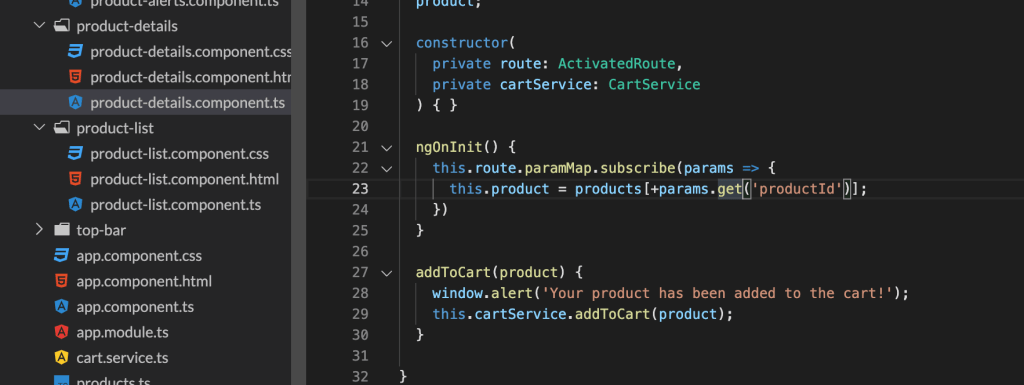
Right now I’m going through Angular’s app tutorial (see what I’ve done so far on GitHub) and I’ve enjoyed it. It is nice to have a guide and not beat your head against something at the beginning. However, I don’t think that tutorials are the best way for really grasping concepts. What I do think is good for that is debugging error messages.

One of the errors I encountered during this walkthrough was that when I added the different phones to the shopping cart, the cart would update, not with the correct item, but just the first item in the array. I then had to go through and figure out why that wasn’t working. It turns out that I just wasn’t referencing the route parameter correctly. Curse you, case sensitivity!

While debugging this incorrect behavior, I learned that the + operator returns a numeric representation of the object in JavaScript. I would not have researched and learned that little tidbit of information if I hadn’t been debugging an error.

So if you’re ever frustrated debugging, slogging through error messages or unexpected code behavior, remember that you’re learning!

-Rachel

You Should Be Using Python Classes

You Should Be Using Python Classes

Python is cool. So are Python classes. If you develop with Python and haven’t used them yet, I suggest that you do. They’re something that I started using a few years ago and they have come in so handy when it comes to re-using code and maintaining scope easily.

When I first started learning about and using classes there were a few things that confused me and were different than just writing a simple script. You can’t -just- run them from the command line and expect them to work. You have to instantiate your class. That means you have to call it and it will create an empty object for you. So say you created a python class in zippy.py.

# zippy.py
class CoolClass:
    def hi(self):
        return 'Hi!'

# instantiate the class from the same file
coolClassObject = CoolClass()

The first thing is that your function is now inside a class. The second thing is you have this variable thing called self. So to instantiate this class you can call it within the same file or you can pull up a python shell and import it.

# pretend this is a python shell

import zippy
coolClassObject = zippy.CoolClass()

So now you’ve got a variable with your class object in it. Yay! Now I guess you want to call your hi function. Super straightforward. coolClassObject.hi() and there you go, you’ll get ‘Hi!’ returned.

The coolest thing about classes (In my opinion, but this is my blog, so what else would you expect?) is the __init__(): method. It’s basically a place where you can initialize all your variables, data passed in when you instantiate the class, etc. You can then use everything in your __init__(): throughout your class. I like being able to define static, global values or any data structures; if I have URLs that I need to reference for APIs I’ll also define them there. You can also pass in parameters when you first instantiate the class (required or optional). So so handy.

# zippy.py
class CoolClass:
    def __init__(yourName='Bort'):
        self.name = yourName
        self.group = 'Cool'
    def hi(self):
        msg = 'Hi, {0}. You are in the {1} group'.format(self.name, self.group)
        return msg

# instantiate the class from the same file with no parameter passed in
coolClassObjectDefault = CoolClass()

# instantiate the class from the same file with your name
coolClassObjectRachel = CoolClass('Rachel')

I’ve added the init method now and I’ve defined an optional variable that you can define when you first instantiate the class. If you’ve made changes in a python shell and you’re using python3 (which I’ll be using unless I say otherwise), you’ll need to import imp to reload the module.

When you run it now, you’ll get your message to return with the default argument of Bort for the first object and Rachel will be in the second one. Notice how I could instantiate two versions of the same class? Super handy.

I’ll wrap up with a brief talk about self. I like to think of it as mega-variable. Python officially calls it an instance variable. Anything that got defined in __init__(): is stored in self and you can then use it throughout the rest of the functions in your class. You just have to make sure that self is passed into each function (you’ll get an error otherwise) and then you can use it throughout your class functions.

-Rachel