When One Liners Make Sense

When One Liners Make Sense

Have you ever written a little one or two line snippet of code you were super proud because it was oh so short and sneaky and clever? But then, like a month (or 20 mins) later, you have to go back to it and you have no idea what that stinker’s actually doing? Yeah, me neither.

A close up of a long haired tabby cat staring directly at the viewer
Keep Calvin happy! Write clean code!

I have some thoughts on little clever bits of code. First of all, they’re cool. Yay for figuring out how to compress say 15 lines into two! Second of all, they can drive me nuts when having to go back to review old code. Especially if it contains regex (shakes fist at regex). I also think that there are sometimes places that are more suited for the clever bits than others. Let me explain . . .

I think that if you’re deliberately trying to condense your work down into fewer lines for the sole sake of fewer lines, you’re in danger of losing the overall clarity of you code. And in the long run, that’s going to make your code more difficult to maintain by you and others.

Now when do I think that a cute one-liner is appropriate? I like to use them when doing so doesn’t distract from the overall idea of the function or method I’m writing. It’s like a mini subroutine (but not) that I don’t have to do any extra work for. For example:

# x is a datetime field
sorted(my_list, key=lambda x:x[1], reverse=True)

I could have written a helper function that went through my list and sorted them by date then reversed it, but it turned out to be much more concise to use a lambda function within the built-in sorted() function. It also made way more sense to just use a built in function rather than writing my own.

Another example:

# _ can be used in python editor to reference whatever 
# was on the previous line. Fun, right?
>>> [1, 23, 1, 45, 5, 9]
[1, 23, 1, 45, 5, 9]
>>> [s for s in _ if s > 10]
[23, 45]

# The following is equivalent to above 
# but in more lines.
foo = [1, 23, 1, 45, 5, 9]
foo2 = []
>>> for each in foo:
...     if each > 10:
...         foo2.append(each)
...
>>> foo2
[23, 45]

But if that logic was more complex and my one liner started getting long and I had to start line wrapping it to fit? Nope, that’s going to be way more difficult to read and understand in the long run. (That also goes against the PEP 8 Style Guide. I like to stay within the 72 character line limit, thank you.) Anyone coming after you that has to do anything with that code (including you) is just going to want to whack you over the head with a boot. Just write out some loops, man.

Have fun finding clever ways of coding!

-Rachel

Tinker with Your Thinker

Tinker with Your Thinker

Howdy howdy howdy! It’s still January and it’s getting ready to be all snowy and icy here. Whee. . . It’s just my favorite. . . You know I’d much rather be scraping snow off my car in the extreme wind than say, sitting on the dock at the lake with a book and iced coffee eagerly awaiting a boat ride later in the afternoon.

Anyhoo, so recently I’ve been thinking a lot about knowledge and how much I know and how much I don’t know and such and such. I tend to go down the rabbit hole of thinking about how many topics and concepts and etc that I don’t know about or don’t know enough about and then just start wallowing in my thoughts. Which got me thinking. . .

Bart Simpson writing, "I will not wallow in my thoughts" on a chalkboard in a classroom.
Look, Ma! I found a

It really isn’t about how much you know, but what you do with the knowledge you do have. I have been trying to focus on what I do know and what I can accomplish with that knowledge, rather than getting discouraged by thinking about all the things I don’t know enough about. With the knowledge I do have, I can do a ton of stuff. And the more I do with what I have, the more potential I have to learn new things. For example, I know how to knit. I’d like to knit something new sometime soon (I want to make some cute mittens or maybe a sweater). I’d really like to have it be in a fair aisle pattern, but I’ve never attempted such a thing. Instead of me getting discouraged, I’m going to just pick a project and start it.

I’m not going to become an expert overnight in some subject, but I do know that I can learn new things every day. And all these new little tidbits of learning add up over time.

-Rachel

Debugging: Your Secret Learning Tool

Debugging: Your Secret Learning Tool

I really like going though tutorials and walkthroughs when I’m learning new things. I think that the best way for me to learn something is by doing, but generally I get overwhelmed as to know where to start. So I generally start off getting my feet wet with tutorials.

Stackblitz has been very convenient to learn with.

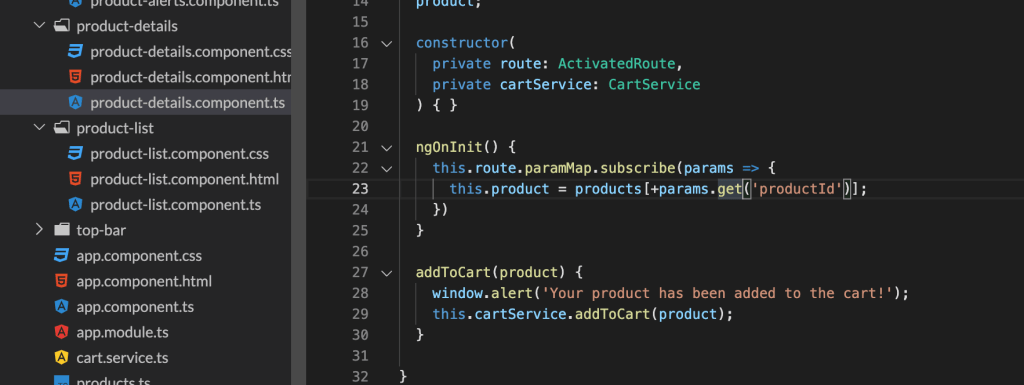
Right now I’m going through Angular’s app tutorial (see what I’ve done so far on GitHub) and I’ve enjoyed it. It is nice to have a guide and not beat your head against something at the beginning. However, I don’t think that tutorials are the best way for really grasping concepts. What I do think is good for that is debugging error messages.

One of the errors I encountered during this walkthrough was that when I added the different phones to the shopping cart, the cart would update, not with the correct item, but just the first item in the array. I then had to go through and figure out why that wasn’t working. It turns out that I just wasn’t referencing the route parameter correctly. Curse you, case sensitivity!

While debugging this incorrect behavior, I learned that the + operator returns a numeric representation of the object in JavaScript. I would not have researched and learned that little tidbit of information if I hadn’t been debugging an error.

So if you’re ever frustrated debugging, slogging through error messages or unexpected code behavior, remember that you’re learning!

-Rachel

Upgrade: My Word of the Year

Upgrade: My Word of the Year

Last year was the year of dealing with unexpected events. I’m not a huge fan of unexpected events and behaviors, myself. It took a lot of energy to handle everything last year, and I’m pooped out.

I’ve been thinking about resolutions, goals, and themes for this new year, and I think I’ve decided on Upgrade as my theme. I want the 2020 upgrade to encompass many things this year.

I want professional upgrades for me to look like learning new skills and applying them. It also means more meaningful networking with other people in town. A lot of the time (most of the time) I seriously doubt every skill and ability I have. I want to lessen those doubts this year. My big goal this year is to actually put a project into my GitHub repo. I have a ton of stuff in private repos and with work, but nothing out and about in public land.

Personal upgrades include upgrades to the house, upgrades in the amount of effort and energy I exert on getting did up on a daily basis, and upgrades in the amount of energy I spend socializing with family and friends. I generally exert the least amount of effort getting ready in the mornings if I get overwhelmed. If you’re into the enneagram at all, I’m a 5w4. It’s been a pretty handy tool in recognizing good and bad tendencies in myself and helping out with some personal growth.

Here’s to 2020 and some high hopes.

-Rachel

Read the Documentation

Read the Documentation

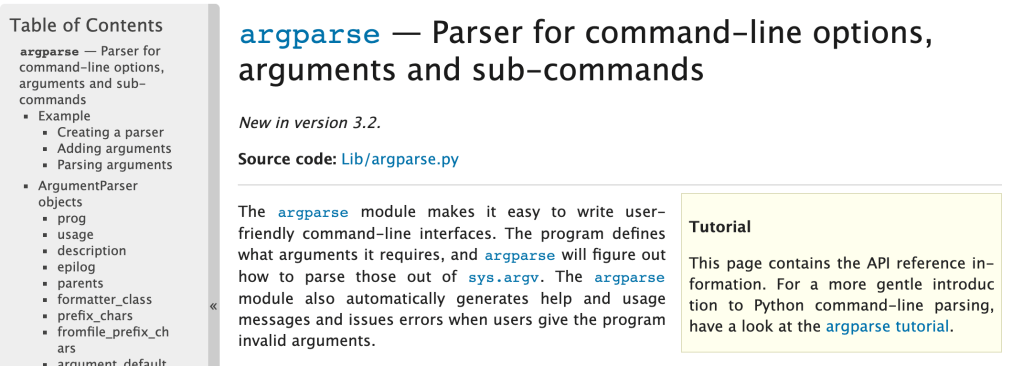
So when I start off learning something, I want to have a perfect knowledge of everything right away. I know that’s not realistic, but here we are. When I have a question about a topic, I generally just do a Google search and find the nearest Stack Overflow article that seems relevant and see what they did to solve my issue. Recently though, I’ve been taking more time to sit down and actually read documentation on specific modules, concepts, technologies, etc and it’s been very helpful. I’ll give some explanation as to why I recommend you read documentation.

Documentation gives you the most in-depth and up-to-date information as to what you’re researching. I always check the date on any articles that aren’t documentation because you never know how old they are and if they’re still relevant. Other types of articles may do a good job at addressing one aspect of what you’re looking for, but if you read the documentation, you’ll get to see other things you might not have realized were options.

You will learn more comprehensively than exclusively reading articles or forum posts. A blog post may not cover every possibility and option available to you for a module, but the documentation will.

You’ll get better at reading and understanding how to read documentation. And with that, get a better understanding of how whatever you’re learning about works. I used to steer clear of reading a lot of documentation because I thought it was difficult to understand. And sometimes it kind of is. However, I’d recommend sticking with it.

-Rachel

You Should Be Using Python Classes

You Should Be Using Python Classes

Python is cool. So are Python classes. If you develop with Python and haven’t used them yet, I suggest that you do. They’re something that I started using a few years ago and they have come in so handy when it comes to re-using code and maintaining scope easily.

When I first started learning about and using classes there were a few things that confused me and were different than just writing a simple script. You can’t -just- run them from the command line and expect them to work. You have to instantiate your class. That means you have to call it and it will create an empty object for you. So say you created a python class in zippy.py.

# zippy.py
class CoolClass:
    def hi(self):
        return 'Hi!'

# instantiate the class from the same file
coolClassObject = CoolClass()

The first thing is that your function is now inside a class. The second thing is you have this variable thing called self. So to instantiate this class you can call it within the same file or you can pull up a python shell and import it.

# pretend this is a python shell

import zippy
coolClassObject = zippy.CoolClass()

So now you’ve got a variable with your class object in it. Yay! Now I guess you want to call your hi function. Super straightforward. coolClassObject.hi() and there you go, you’ll get ‘Hi!’ returned.

The coolest thing about classes (In my opinion, but this is my blog, so what else would you expect?) is the __init__(): method. It’s basically a place where you can initialize all your variables, data passed in when you instantiate the class, etc. You can then use everything in your __init__(): throughout your class. I like being able to define static, global values or any data structures; if I have URLs that I need to reference for APIs I’ll also define them there. You can also pass in parameters when you first instantiate the class (required or optional). So so handy.

# zippy.py
class CoolClass:
    def __init__(yourName='Bort'):
        self.name = yourName
        self.group = 'Cool'
    def hi(self):
        msg = 'Hi, {0}. You are in the {1} group'.format(self.name, self.group)
        return msg

# instantiate the class from the same file with no parameter passed in
coolClassObjectDefault = CoolClass()

# instantiate the class from the same file with your name
coolClassObjectRachel = CoolClass('Rachel')

I’ve added the init method now and I’ve defined an optional variable that you can define when you first instantiate the class. If you’ve made changes in a python shell and you’re using python3 (which I’ll be using unless I say otherwise), you’ll need to import imp to reload the module.

When you run it now, you’ll get your message to return with the default argument of Bort for the first object and Rachel will be in the second one. Notice how I could instantiate two versions of the same class? Super handy.

I’ll wrap up with a brief talk about self. I like to think of it as mega-variable. Python officially calls it an instance variable. Anything that got defined in __init__(): is stored in self and you can then use it throughout the rest of the functions in your class. You just have to make sure that self is passed into each function (you’ll get an error otherwise) and then you can use it throughout your class functions.

-Rachel

Level 0 Docker Cheat Sheet

Level 0 Docker Cheat Sheet

I’ve been playing around and modifying some existing Docker containers recently and here’s a couple of commands that I found out I use a lot. There’s a lot of extra flags you can give these little commands and you can peruse the docs for more information on them.

docker ps lets you list all your running containers and their details. A lot of the times you need the container name or ID for various reasons and this allows you to grab that information. Super handy.

Another good command for listing things (images specifically) is docker image ls. This lets you list all of the images.

docker logs [container name] is great for debugging and checking any logs that may occur in your container.

docker exec -it [container name or ID] /bin/bash lets you start a bash session in the container you define. You can use the container name or it’s id (which you handily got from using docker ps. The -it is saying to keep STDIN open even if not attached and to allocate a pseudo-TTY. Within this you can go to town making changes. Keep in mind the container is stateless, so you’re not going to have anything saved if you restart the container. Use exit to quit and return to your main terminal.

docker kill [container name or ID] will kill the container and you’ll no longer see it in your list-o-docker-containers when you run docker ps. However to completely remove it, you may need to follow it up with docker rm [container name or ID] if you get an error fussing about already being in use by container X. I’ve found this to be the case for me a lot.

-Rachel

Rachel Learns About Docker: Basic Definitions

Rachel Learns About Docker: Basic Definitions

So Docker. Docker. Everyone’s talking about Docker a lot. Everyone says Docker is important. So what does one do about all this Docker? Well, I started reading the documentation because I have only a vague idea of what it is supposed to do.

I do like their logo.

My initial thoughts on reading the overview:

  • Seems very similar to Python virtual environments but not restricted to just Python.
  • I have a suspicion that I could develop and deploy my apps for work easier with this.
  • There’s a lot to learn and a lot of definitions to keep straight and remember.

For my own benefit, I’m going to outline here some key definitions from my reading. Usually writing something down helps me remember it and solidify the concepts.

Docker consists basically of images that you use to make containers which allows you to have a lot more flexibility with moving around and editing and deploying applications. Below are some basic definitions are each, which I found helpful to have outlined a bit more succinctly than their wordier explanations in the official documentation.

Docker Images

  • Read only template
  • Generally base it on one image and then customize your own image to suit your needs
  • Defined in a Dockerfile
  • Like onions and ogres, Dockerfiles have layers. Unlike ogres, Dockerfiles define the layers with instructions.
  • Only changed layers are rebuilt when the image is rebuilt
  • The image provides the filesystem

Docker Containers

  • TL;DR a container is an encapsulated running process with it’s own filesystem
  • A runnable image instance
  • Define your container with its image and your configuration options
  • Isolated from everything else and you get to control networking, storage, etc on it.
  • Uses namespaces for each container and container isolation
  • Use control groups to limit an application’s resources

Docker Services

  • Swarm = scale containers across multiple Docker daemons
  • Daemons communicate through the Docker API
  • Lets you define the state for your swarm.

Well, there’s the very basic gist from my reading. I was able to get Docker desktop successfully installed and running no problems with their documentation. More later.

-Rachel

A Super Easy Way to Get Git Autocomplete Working on a Mac

A Super Easy Way to Get Git Autocomplete Working on a Mac

So I’ve just recently transitioned over from using a PC to using a mac for development. (I like developing on a mac a lot better) One of the first things I noticed though, was that git wasn’t autocompleting for me when I was working locally. I’m used to just ssh-ing in to servers and git just always would autocomplete. Not so with iTerm, so I went to the internet to find out how to fix this.

I found a couple of posts on Stack Overflow, outlining how to use brew and git bash-completion and tried those out with no success. I did learn about .zshrc and .bashrc and some other config files, so it wasn’t a complete loss.

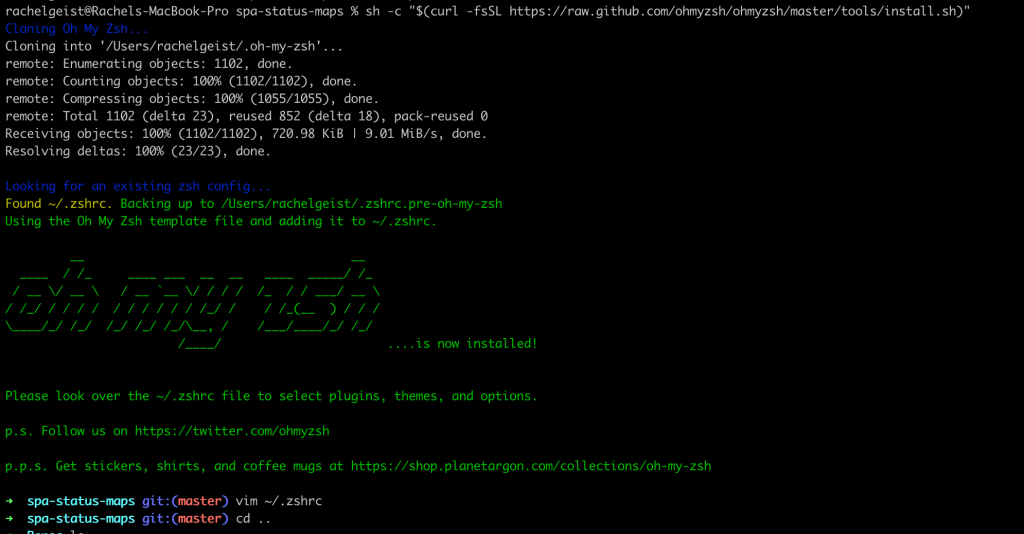
In the end, I got a tip to try Oh My Zsh. I installed it via curl as directed on their homepage and there you go. I could tab out all my git commands without having to edit bash_completion.d or any other file. There’s lots of plugins you can install and git came installed by default.

If I wanted to add more plugins, I’d just edit my ~/.zshrc file and add them as plugins. Super fast and super easy.

Look how pretty and useful!

I will say that if you want to also install the Docker plugin, there’s currently a bug with installing that one. To get that to work remove the zcompdump file in your home directory and then restart iTerm.

rm ~/.zcompdump-[DEVICE NAME]-[Numbers]

-Rachel

Rachel Starts a Blog

Rachel Starts a Blog

So I’ve been thinking about this for a while and finally decided to start a blog for my professional self. I’ve written blogs before, but they’ve all been personal and short lived. The goal with this website is to write about cool things I’m learning about at work and on side projects.

What Do I Plan on Writing About?

  • Python!
  • Queries!
  • Stuff I’m Currently Learning!
  • Other Topics I Deem Relevant to the Scope of This Blog!

Right now I’m learning about Docker, so I’ll probably start off with some posts regarding that and my Learning Journey. (Because that sounds a lot better than Iterative Keyboard Head Banging and Sporadic Ah Ha Moments. . .or does it?)

My Gang: Brett, Ellie, and Me (photo by Shannon Anderson)

For posting frequency, we’ll see. My long term goal is to post weekly, but I’m probably going to start off posting once per month or every two weeks. Something reasonable that won’t overwhelm me.

Anyhoo, I hope that you’ll enjoy reading about whatever I deem relevant of writing and then posting about.

-Rachel